Gaming Desk Glow Up: Master Your Cables, Max Your Vibe
Let's be real, an epic gaming setup often comes with an equally epic, tangled mess of cables. You've got your monitor, PC, keyboard, mouse, headset, controller chargers, and who knows what else all vying for space and creating a veritable spaghetti monster under your desk. It's not just an eyesore; it can be a total vibe killer and even trip you up (literally!). But don't throw in the towel just yet! We're here to rescue your precious battle station from the cable chaos with some super easy, game-changing tips that'll have your gaming desk looking sleek, clean, and ready for action.
Essential Cable Management Products You Can't Live Without
Alright team, let's talk about the unsung heroes of a tidy gaming setup: the cable management products themselves! You can have all the best intentions in the world, but without the right tools, it’s like trying to build a PC with just a butter knife. We need to arm ourselves with some fantastic gear to truly conquer the cable beast.
Think of these as your personal arsenal against tangled messes. They’re designed to make your life easier, keep things secure, and frankly, make your desk look a million times better. From simple ties to sophisticated trays, each item plays a crucial role in achieving that picture-perfect gaming station you've been dreaming of.
Getting the right products is half the battle, trust me. You don’t want to skimp on quality here; sturdy cable management means less re-doing later, and who has time for that when there are games to play? We’re going for a lasting solution, not a temporary fix.
Below, I’ve put together a handy table of some must-have items that will instantly upgrade your cable management game. These are tried-and-true solutions that countless gamers swear by for keeping their digital domains pristine and organized.
Investing a little bit of time and money into these products will pay dividends in the long run. You’ll experience less frustration, easier cleaning, and a more streamlined setup. Let’s dive into the specifics and get you started on your organizational journey!
| Product | Why It's Great | Top Tip |
|---|---|---|
| Cable Sleeves/Wraps | Perfect for bundling multiple cables together into one neat, flexible tube. Reduces visual clutter and protects cables. | Measure the length needed and consider a braided sleeve for extra durability and aesthetics. |
| Cable Ties (Velcro Reusable) | Infinitely adjustable and reusable. Great for temporary bundles or for fine-tuning cable runs without permanent commitment. | Always keep a roll handy; they're incredibly versatile for quick fixes and adjustments. |
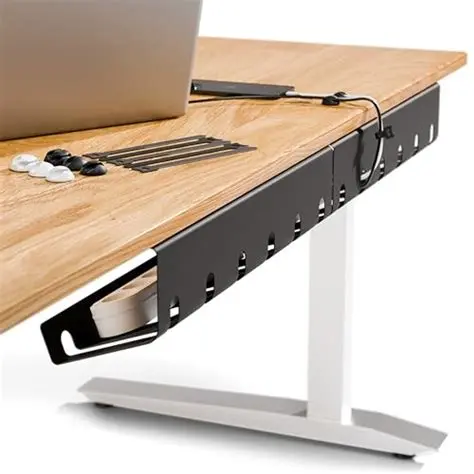
| Cable Management Trays/Nets | Attaches under your desk, providing a hidden sanctuary for power bricks, excess cable length, and surge protectors. | Opt for a spacious metal tray for heavy-duty setups, or a fabric net for lighter loads and easier installation. |
| Adhesive Cable Clips/Mounts | Ideal for routing individual cables along desk legs, walls, or the underside of your desk. Keeps them precisely in place. | Clean the surface thoroughly before applying for maximum adhesion. Use strong 3M adhesive for reliability. |
| Desk Grommets/Cable Passthroughs | Creates a clean opening in your desk surface for cables to pass through, especially useful for monitor cables. | Ensure your desk has pre-drilled holes or be prepared to carefully drill one yourself (measure twice, drill once!). |
Strategic Cable Routing and Placement: The Art of Disappearance
Now that you've got your arsenal of cable management products, it's time to talk strategy. This isn't just about stuffing cables wherever they fit; it's about making them disappear as if by magic. Strategic cable routing is truly an art form, transforming a spaghetti monster into a sleek, minimalist setup. It involves planning, patience, and a bit of creative thinking to achieve that elusive clean look.
The core idea is to follow the path of least resistance, but also the path of least visibility. Start by mapping out where each cable needs to go from its source to its destination. Think about the shortest possible routes, but also consider how you can tuck them away along existing structures like desk legs, monitor arms, or behind your PC tower. This foresight will save you a lot of headache later.
One fantastic technique is to route cables along the natural edges and corners of your desk. Using adhesive clips or even a well-placed cable tie, you can secure cables tightly against the underside or rear of your desk. This keeps them out of sight and minimizes dangling wires, which are the primary culprits of visual clutter. Remember, the goal is for the cables to be seen as little as possible.
Consider the “spinal cord” approach for your main power and display cables. Bundle them together using sleeves or wraps and then run this main bundle down a single desk leg or directly into a cable management tray. This creates one thick, manageable line instead of a dozen individual strands, making the whole setup feel much more organized and streamlined. It’s like creating a superhighway for your wires.
For peripherals like keyboards and mice, try to route their cables directly towards their respective ports on your PC. If your PC is on the floor, consider running these cables directly down the back of the desk leg closest to the PC, securing them as you go. Wireless peripherals can still benefit from strategic placement of charging cables or docks, ensuring those are also neatly tucked away when not in use. Consistency and meticulousness are key to truly mastering this strategic approach.
Advanced Tips for Wireless Peripherals: Beyond Just No Wires
"But I have wireless peripherals!" you might exclaim. "My desk is already clean!" Hold on a minute, because even wireless devices aren't truly wire-free. They still need power, charging cables, and often a dongle or two. Managing these elements is a crucial, often overlooked, aspect of maintaining a truly pristine gaming setup. It's about optimizing the charging ecosystem and minimizing visible clutter, even for your wire-free gear.
One of the biggest culprits for wireless clutter is the charging cable itself. Instead of letting it sprawl across your desk whenever your mouse or headset needs a juice-up, consider dedicated charging solutions. A wireless charging mat integrated into your desk (if compatible) or a sleek charging dock for your specific mouse or headset can make a world of difference. These solutions provide a designated, tidy spot for power-ups.
For dongles, try to use USB hubs that can be tucked away. If your monitor has built-in USB ports, that's often a prime spot to plug in your mouse or keyboard dongle, keeping it close to the devices but off your desk surface. If you must use a hub, make sure it’s a compact one that can be mounted under your desk or hidden behind your monitor, keeping its own cable neatly managed.
Battery life management also plays a role. Get into a routine of charging your wireless peripherals overnight or during breaks, so you're not scrambling for a cable in the middle of a gaming session. This proactive approach means less time with cables snaking across your desk, disrupting your clean aesthetic. A fully charged device is a truly wireless device, at least for a while.
Think about the placement of your wireless devices when not in use. Does your headset have a stand? Is there a designated spot for your controller? Even when they’re not plugged in, having a consistent, tidy home for these items contributes significantly to the overall cleanliness of your desk. These little habits make a huge impact on maintaining that super-organized feel. Embrace the 'always a place for everything' mentality.
Maintaining Your Cable Management System: Keeping It Pristine
So, you've conquered the cable beast, your desk is sparkling clean, and everything is where it should be. High five! But here’s the thing about cable management: it’s not a one-and-done deal. It’s an ongoing relationship. Just like you maintain your gaming rig's software, you've got to maintain its physical organization too. Dust happens, new peripherals arrive, and sometimes cables just decide to stretch out of place.
Regular check-ups are key. Once a month, or whenever you notice a stray cable peeking out, take a few minutes to give your system a once-over. Are all the cable ties still secure? Have any adhesive clips come loose? A quick tighten or re-application can prevent a small issue from spiraling into a full-blown spaghetti situation down the line. It's easier to fix minor problems proactively than to redo everything from scratch.
Cleaning is also an essential part of maintenance. Cables, especially those tucked away, can become dust magnets. A can of compressed air is your best friend here. Gently blast away dust from cable bundles, trays, and around your PC ports. This not only keeps things looking clean but can also help with airflow and prevent dust buildup inside your components. A little bit of regular dusting goes a long way for aesthetics and longevity.
When you introduce new gear, whether it's a new monitor, a different mouse, or an upgraded microphone, resist the urge to just plug it in and let the cable hang. This is the moment where good intentions often falter. Instead, make it a rule to integrate any new cables into your existing management system immediately. Take the extra five minutes to route it properly, add it to a sleeve, or secure it with a tie. This discipline is crucial.
Finally, don't be afraid to adjust and adapt. Cable management isn't rigid; it should evolve with your setup. If you find a certain routing uncomfortable or inefficient, change it! Experiment with different solutions until you find what truly works best for you and your specific gear. The goal is long-term neatness and functionality, so flexibility is a virtue. Keep that desk looking sharp!
FAQs About Gaming Desk Cable Management
Got more questions buzzing around your head about taming those unruly cables? You're not alone! Cable management can sometimes feel like a puzzle, but with the right answers, you'll be a pro in no time. We've compiled some of the most common questions gamers ask about keeping their desks neat and tidy. Let's clear up any lingering doubts and get you on the fast track to a super clean setup!
What's the absolute first step in cable management?
The very first step is to unplug EVERYTHING. Seriously! Get all the cables off your desk and out from behind your PC. This gives you a blank canvas to work with and helps you see exactly what you're dealing with.
How do I know which cables belong to which device?
Labeling is your best friend! Before you unplug everything, use some small label makers or even masking tape and a marker to identify each end of the cable. Trust me, you'll thank yourself later.
Are cable ties or Velcro straps better?
Both have their place! Velcro straps are fantastic for flexibility and reusability, great for bundles you might frequently adjust. Cable ties (zip ties) offer a more permanent, secure hold, ideal for hidden bundles you won't touch often.
My desk doesn't have grommets. What should I do?
If your desk has space, you can install them yourself with a drill and a hole saw. If not, utilize cable clips to route cables along the edges or underside of your desk to keep them out of sight.
Where should I put my power strip/surge protector?
Ideally, in a cable management tray or net mounted underneath your desk. This keeps it completely out of sight, along with all the bulky power bricks plugged into it.
How do I manage thick display cables like DisplayPort or HDMI?
These thicker cables are often rigid. Try to route them directly down your monitor arm (if you have one) or secure them tightly along the back of your desk using sturdy adhesive clips. Cable sleeves can help bundle them with thinner cables.
What about headphone cables?
For wired headphones, use a headphone stand that can sit on or be clamped to your desk, allowing the cable to drape neatly. You can also use small adhesive clips to route the cable along the stand or desk leg.
My desk is against a wall. How does this change things?
It can make things easier! You can often hide cables directly behind your desk, running them along the wall. Use wall-mounted cable raceways or channels for an even cleaner look.
Is it bad to coil cables tightly?
Avoid extremely tight coiling, especially for data cables, as it can potentially damage the internal wires over time or interfere with signal. Gentle loops are fine for managing excess length.
How can I hide cables on a glass desk?
Glass desks are challenging! Your best bet is to use clear adhesive clips or tape, and meticulously route cables along the very back edge or underneath if possible. Minimize visible cables as much as possible, focusing on clean bundles.
What if I frequently move my setup or add new devices?
Opt for more reusable solutions like Velcro straps and modular cable management trays. Design your system with easy access in mind, so you can make quick adjustments without dismantling everything.
Should I unplug my cables when not in use?
Not necessary for cable management purposes, but it can be good for energy saving or for safety during electrical storms. For neatness, just ensure the cables are managed whether plugged in or not.
How often should I clean my cable management system?
A quick dusting with compressed air once a month is a good habit. Re-check your ties and clips every few months or whenever you notice things getting a bit messy.
Can cable management improve performance?
Indirectly, yes! Better airflow around your PC components (due to less cable clutter blocking vents) can help with cooling, potentially leading to better performance and longevity for your hardware.
Is cable management worth the effort?
Absolutely! A clean desk reduces visual distractions, improves focus, makes cleaning easier, and simply looks fantastic. It's a small investment of time for a huge payoff in aesthetics and peace of mind.
Happy Gaming, Tangle-Free!
Alright, gamers and desk enthusiasts, that’s the lowdown on getting your cables sorted! It might seem like a bit of a project at first, but trust us, a clean, organized desk is a total game-changer for your focus, your mood, and honestly, just how good your setup looks. No more wrestling with rogue wires or getting tangled in the heat of battle. Thanks a million for reading through! We really appreciate you stopping by. Now go forth, conquer those cables, and enjoy your pristine battle station. Keep an eye on our space for more tips, tricks, and all things gaming. Until next time, stay neat and game on!